A literary clock for your Kindle
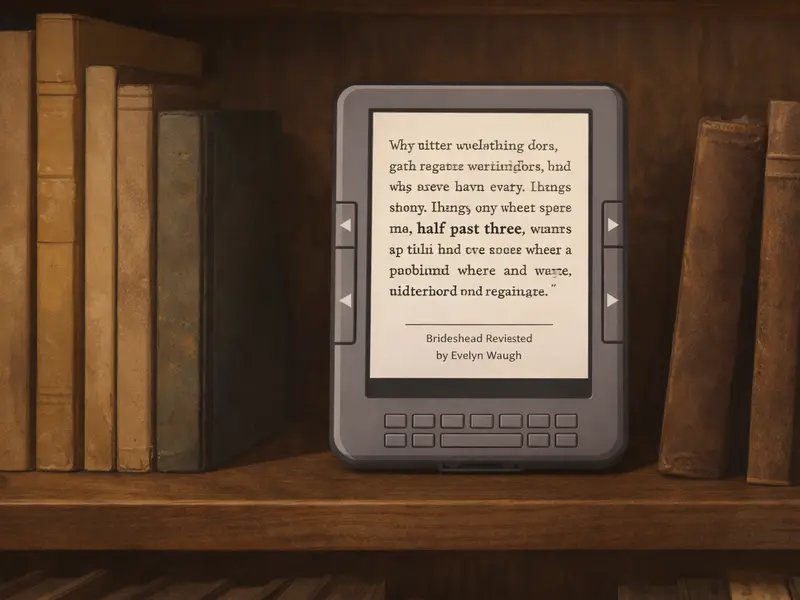
Instead of showing numbers, it shows a quote from a book that contains the current time.
Medium difficulty Free guide
The Literary Clock is one of those ideas that sounds gimmicky when you first hear it and then quietly refuses to leave your head. It’s a clock. It tells you the time. But every minute it shows a different book quotation that happens to contain the current time. Twelve past three might give you a line from Murakami. Twenty to eight might be something from Agatha Christie. For the full day there are 1,440 minutes, and enthusiasts have assembled 1,440 matching quotes.
It is genuinely beautiful, entirely useless, and a perfect reason to keep an old Kindle on a shelf. BGR listed it among the best creative uses for old Kindles; the original concept comes from an art project by Jaap Meijers, and the quote sets have been compiled and shared by the maker community on GitHub.
What the finished thing does
Every minute, the Kindle displays a new quote. Each quote contains the current time somewhere in its text — “It was half past four in the morning and Susan was still awake”, say, or “He checked his watch: 11:45”. Below the quote, the clock shows the book title, the author, and often a small credit. The refresh is nearly silent and uses almost no battery.
Because the Kindle screen holds an image with zero power between refreshes, the only cost of updating once a minute is the brief moment it takes the e-ink controller to repaint the screen. A wall-mounted Kindle doing nothing but running the literary clock will run for a surprisingly long time on a single charge — days to a couple of weeks, depending on the model.
What you’ll need
- An affected Kindle that can be jailbroken (Kindle Touch, Kindle 4/5, Kindle Keyboard, Paperwhite 1st gen — see the jailbreak section).
- A jailbreak via WinterBreak from kindlemodding.org.
- A quote set. The maker community has published several curated sets, some with 1,440 entries and some larger. They are text files with fields for the time, the quote, the book title, and the author.
- A small script that runs on the Kindle every minute and picks the appropriate quote for the current time, renders it to an image, and paints it to the screen.
- A frame or stand to mount the Kindle somewhere you’ll see it. Kitchen shelves and bookcases are the usual homes.
How it works
- You load a quote set onto the Kindle’s storage.
- The Kindle’s internal clock runs normally. A small shell script, triggered every minute via cron, reads the current time and looks up the matching quote in the quote-set file.
- The script generates a rendered image of the quote using the Kindle’s
eipstool (or KOReader’s display helpers, if you’ve installed KOReader). - The Kindle’s screen is updated. The refresh is fast enough on most models to happen in under a second.
- Repeat, minute by minute, until somebody takes it down to charge.
Advanced builds include:
- A different typeface for each quote, hinting at the book’s era or mood
- A credits screen that shows briefly on the hour with the day’s most beautiful entry
- A “quiet hours” mode that skips late-night updates to save battery
- Multiple language quote sets so non-English readers can see authors they actually read
Which Kindle models does this work on?
Any jailbreakable e-ink Kindle. The E-ink Pearl screens on the 2011 and 2012 devices render text beautifully — arguably more beautifully than the backlit screens on newer models, because there’s no subtle glow competing with the type. The Kindle 4 and 5 buttons (no touch) are a nice match for a wall-mounted clock because there’s no accidentally-poked screen. Paperwhite 1st gen adds the backlight for night reading but slightly higher power draw.
Not recommended: Kindle Fire tablets (LCD, wrong aesthetic, shorter battery). Kindle 1st and 2nd gen are technically possible but community support is thin.
Gotchas and honest notes
- The quote-set is the project. A good set, curated with care, is what makes this worth doing. A lazy set of computer-generated “She checked her watch: 4:15” quotes is not charming. Find or build a proper one.
- Screen refresh is not completely silent. Some older Kindles make a faint click when the e-ink refreshes. In a quiet room at night this is audible.
- Battery life varies with refresh method. Using
eipsdirectly beats running the browser in a loop. Expect a week or more on a full charge if done right. - Do not factory-reset the Kindle if something breaks. Re-install the script instead. See the warning page.
Where to go next
The Survival Guide has a dedicated literary-clock chapter that walks through installing a curated quote set, setting up the cron job, and tuning the refresh for battery life. It also links to the best open quote-set repositories on GitHub at time of writing, which change frequently as the community maintains them.
If you’re curious and want to see someone else’s build first, start with the BGR round-up at bgr.com/2051007/uses-for-your-old-kindle/, which covers the literary clock as one of several ideas.
Other projects you might like
- Weather dashboard — if you’d rather the screen show something practical
- Smart home dashboard — for live sensor data instead of book quotes
- Free 70,000-book library — for the books behind the quotes
Sources for this page: BGR — “Uses for your old Kindle”; the original Literary Clock art project by Jaap Meijers (various online write-ups); community quote sets on GitHub (repositories change frequently). Not affiliated with Amazon.